Wird aktualisiert
Slicr - Remix & Slice Beats
Veröffentlicht: 2016-12-16
© Copyright Beatshop Labs, LLC


iPhone Screenshots
iPad Screenshots

Beschreibung
SLICR, the World's First Visual Waveform Drum Pad + Beat Maker for iPad and iPhone
- Turn your iOS device into a professional sample slicing & chopping, beat making & music production tool
- Slice, Sample & Remix your song library, DJ, Compose, & Share your creations!
Join the community, share Kits. Send us an email: beatshoplabs@gmail.com
// KIT + SLICE CREATOR
Use the Kit Creator to automatically slice and chop your music library with 1 tap to inspire new ideas.
// HEAR & SEE SOUNDS with WAVE VIEW
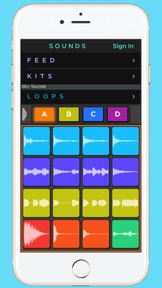
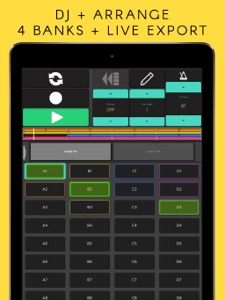
Slicr is the first drum machine sampler to feature a Wave View, which allows you to easily distinguish sounds on pads and read waveforms. Slicr includes everything you need to create a beat quickly and easily, including 4 banks of sample & slices, built-in effects, plus the ability to create new sequences, loops and record beats.
// SOUNDS
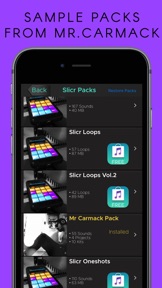
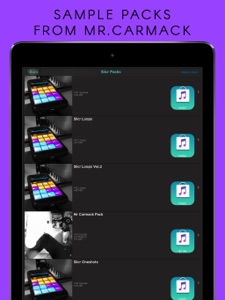
Collect more than 600 free high-quality, professionally recorded samples of knocking drums, luscious synths, smooth bass and 808s for Electronic, Trap & Hip-Hop from renowned DJs / Producers like MR. CARMACK and DECAP or import sounds from your iTunes Library & Dropbox.
// SLICE
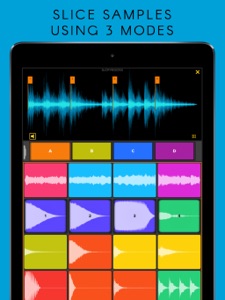
Use up to three slicing modes to repurpose your music library and your own custom sample collection for remixes and sample chopped beats. Combine your chops with Slicr Sounds and you’re ready to make beats like Kanye!
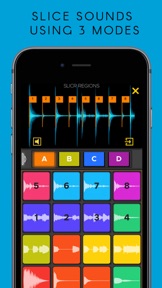
• Region Slice Mode - chop a sample into equally sized slices.
• Auto Slice Mode - detect and intelligently position slice points within a sample.
• Manual Mode - swipe to place slice markers directly on the waveform.
// FEATURES
• Sample from music library or import your own library
• Import via Dropbox, iTunes or record from your device's mic input.
• Use 64 Wave View drum pads for real-time sequencing.
• Exclusive free Slicr Sounds & Mr.Carmack sound packs.
• More than 600 samples and 10 template songs
• Slice sounds using 3 distinct modes for sampling found in classic samplers
• Simple drag and drop sound selection with audio preview
• Built-in effects: delay, distortion, reverb
• One shot/Hold mode: cutoff the sound when you lift off the device
• Choke Groups: A pad’s sample will cut off another sample if its in the same choke group
• Resample Slicr's DJ effects back into your pads.
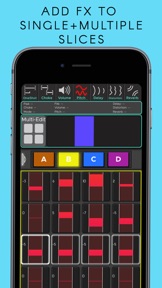
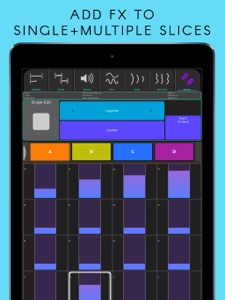
• Route FX to individual slices (ex. Apply reverb to pad 1)
• Share your Slicr Kits and selections with Slicr’s Kit Feed
• Pitch slices up and down for classic sampler pitching
• Create new sequences, record and overdub beats
• Live Loop queuing for real-time performance and playback
• Quantize Time correct: 1/4 note – 1/32
• Glitch Master effect - 1/16 - 1/4
• Delay Fade Master effect
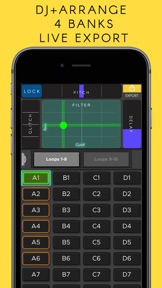
• Highpass and Lowpass Filter Master effect
• Varispeed pitching with Lock and Drop (pitch drop 1/1 - 1/4) modes
• Change the colors of the pads to your liking
• No matter which iOS device you use, Slicr adapts to your screen size
• Export your loop based arrangement in real-time in DJ mode.
• Transfer recordings to your computer via iTunes
// SEE YOUR MUSIC LIBRARY
Utilize your iTunes Library and Dropbox of songs for remixing! Import songs from your iTunes Library, Dropbox, Slicr sound packs, and your own ".wav" samples to the “CRATE”. Then collect and edit snippets of songs for reuse in sample based beats, remixes and mashups.
// EXPERT CONTROLS
Applying and routing reverb, delay and distortion can be done to a single slice or to multiple slices. Add some smoothness and control with the one-shot/hold mode and choke groups.
TIP: One common approach is to crop a sample to 1 bar, before cutting it with regions mode across 4 pads. Then add the 4 pads to the same choke group in one-shot mode.
// FEEDBACK + SUPPORT:
Go to Support URL below (www.facebook.com/slicrapp), tap on the Send Email button.
For manual, tutorials, feature requests: www.facebook.com/slicrapp
Neue Funktionen von Version 1.1.8.3
Thanks for using Slicr. Version 1.1.8.3 has several new features! To make our app better for you, we bring updates to the App Store regularly!
- Preview Bug and others fixed
- Dropbox sample importing
- Live Sampling
- Slicr Kit Creator
- Continued performance improvements.
+ Our new Dropbox features allows you to login to Dropbox to download files from your DropBox account. Keep digging for samples anywhere!
+ Use your device's mic to slice and dice sounds from the real world. Capture any sound anywhere.
+ Create Drum Kits and slice samples from your Crate and Slicr Sounds with 1 tap. Load up your crate with Dropbox then go to Kits>Kit Creator, choose a type then start jamming!
Please email info@Beatshoplabs.com for any questions and feedback!
Anbieter
Name
Beatshop Labs, LLC
Informationen
Entwickler
Kategorien
Version
1.1.8.3
Größe
151,1 MB
Game Center
Nein
VPP Device Licensing
Ja
Bewertung
Altersfreigabe: 4+
Kompatibilität
iOS 9.3 oder neuer
Geräte
iPad Air, iPad mini 4 (Cellular), iPad mini 3, iPad mini (5. Generation), iPad Pro (11") Wi-Fi + Cellular, iPad (5. Generation) Wi-Fi + Cellular, iPad (6. Generation) Wi-Fi + Cellular, iPad Pro, iPad mini (5. Generation) Wi-Fi + Cellular, iPad Pro (12,9", 3. Generation), iPod touch (6. Generation), iPad mini Retina (Cellular), iPad Air (Cellular), iPad Air 2 (Cellular), iPad mini 4, iPad Pro (12,9", 3. Generation) Wi-Fi + Cellular, iPad Pro (12,9", 2. Generation), iPad (5. Generation) Wi-Fi, iPad Air (3. Generation) Wi-Fi + Cellular, iPad Pro (Cellular), iPad Pro (12,9", 2. Generation) Wi-Fi + Cellular, iPhone 8 Plus, iPad Pro (9,7 Zoll), iPhone XR, iPad Air 2, iPad (6. Generation) Wi-Fi, iPad Air (3. Generation), iPhone 8, iPad Pro (10,5") Wi-Fi + Cellular, iPhone 6s, iPad Pro (9,7 Zoll) (Cellular), iPhone 7, iPhone 7 Plus, iPhone XS Max, iPhone 6, iPhone X, iPhone 6 Plus, iPhone XS, iPad Pro (10,5"), iPhone SE, iPhone 5s, iPhone 6s Plus, iPad mini 3 (Cellular), iPad Pro (11")
Sprachen
Englisch
App Store: Kundenbewertungen
Bewertungen & Rezensionen
0,0 von 5 (Keine Bewertung)
App Store: Kundenrezensionen
Kein Eintrag