InfoBedingungenDatenschutzKontakt
 
Wird aktualisiert
HOS Smart Home digitalSTROM

HOS Smart Home digitalSTROM

Veröffentlicht: 2017-07-18
© 2015-2025 House Operating System (HOS) All rights reserved
HOS Smart Home digitalSTROM - QR Code
Version 7.44
4+
Laden im App Store
Version 7.44
4+
Laden im App Store
Veröffentlicht: 2017-07-18
© 2015-2025 House Operating System (HOS) All rights reserved

iPhone Screenshots

Screenshot
Screenshot
Screenshot
Screenshot
Screenshot
Screenshot
Screenshot
Screenshot
Screenshot
Screenshot

iPad Screenshots

Screenshot
Screenshot
Screenshot
Screenshot
Screenshot
Screenshot
Screenshot
Screenshot
Screenshot
Screenshot

Beschreibung

House Operating System (HOS) for digitalSTROM is a full-featured home automation software with support for digitalSTROM smart home devices, meters and protocols., This can turn your Smart Home dream into Reality, with compatibility to every digitalSTROM controlled Device (Fully Supported SONOS Audio, iRtrans iR Remote Control, & IFTTT [Internet Smart Home presets & actions]). The software is an apple iOS or TVOS application that is configured and controlled from anywhere in the world with any web-enabled iOS or TVOS device.
Designed to control multiple properties and houses at the same time.
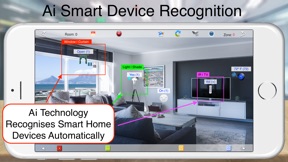
Ai technology visually detects all smart devices in your house using the devices camera live mode or the pre selected wallpaper (Live Edition).
Including Global System Events Actions And Control Into Each Smart Button You Create (DoorBell, Come/Arrive, Wakeup/Sleep, etc.).
Ability to Control Multiple Devices from Several digitalSTROM Servers in A Single Room View (Best For Smart Hotel Rooms Master Control).
Improved Apple Watch Presets/Scenes Color Group Control
Including The Global Events View and Control.
WYSIWYG (What You See Is What You Got) technology allow you to use your iPhone/iPad camera to add real rooms / devices photos / skins to be controlled by a simple touch. VR (Virtual Reality) simulate the exact actions of the real push button wall / in-line switches in your room with a set-up easier than setting a channel on your conventional TV.
Multi Layers Option Allowing you to Add A frame or alpha pictures on each others to build your own unique custom room design making home control more user friendly.
House Operating System (HOS) is designed to control light switches, thermostats, door locks, audio / video equipment, cameras, garage doors, water valves, energy monitors and much more. With a dedicated library of rooms profiles and remote controls skins professionally designed to meet with most modern houses rooms and devices.
Main Features:
- Controls light, wall / inline switches, thermostats, door locks, garage doors, water valves, energy monitors, environmental sensors, cameras and more!
- Runs digitalSTROM devices, meters, and protocols.
- Can issue spoken messages for alerts, announcement and reminders thru internal Device Speaker and thru ip speakers (SONOS).
- Multi profiles allowing you to control as many houses as you wish from the same iOS device.
- Backup and Restore your houses profiles on your personal computer and on iCloud.
- WYSIWYG (what you see is what you got) technology allow you to use your iPhone/iPad camera to add real rooms/devices photos / skins to be controlled by a simple touch.
-Multi Layers Option Allowing you to Add A frame or alpha pictures on each others to build your own unique custom room design making home control more user friendly.
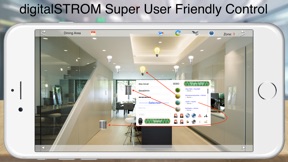
- User friendly customized on screen switches using VR (virtual reality) technology simulate the exact actions of the real push button wall / in-line switches with a set-up easier than setting a channel on your conventional TV.
- Dedicated library of rooms profiles and remote controls skins professionally designed to meet most modern houses rooms and devices.
- Wizard globes allows you to Test and Control Global Events nature actions like wind, rain, hail, and frost, these conditions can be connected directly to control room devices and / or gives you voice alerts, and more.
- Status control system for panic, leave / arrive, fire, wake / hibernate, and 4 user independent alarms.
- Full control of SONOS speakers with TTS (text to speech) for user announcements, system commands, warning alerts, and entertainment.
- Custom Icons Allow You To Choose The Desired Icon For Each Button You Create.
- Apple Watch total control of Presets and Global Events.
- This is an all devices App (iPhone/iPad, Apple Watch, and AppleTV) which means you can pay for one device and download the app for all other devices for free.

Neue Funktionen von Version 7.44

- More Security Networking Now Support TLS 1.3
- Optimized for Mac in Full Screen and Window Modes.
- Apple Watch Access to your Preferences On iCloud so it can share And Control Recordable Scenes data from iPhone/iPad, Apple TV or Mac

Anbieter

Informationen

Kategorien

Version

7.44

Größe

158 MB

Game Center

Nein

VPP Device Licensing

Ja

Bewertung

Altersfreigabe: 4+

Kompatibilität

iOS 13.6 oder neuer

Geräte

iPhone 5s, iPhone 6, iPhone 6 Plus, iPhone 6s, iPhone 6s Plus, iPhone SE, iPhone 7, iPhone 7 Plus, iPhone 8, iPhone 8 Plus, iPhone X, iPhone XR, iPhone XS, iPhone XS Max, iPhone 11, iPhone 11 Pro, iPhone 11 Pro Max, iPhone SE (2. Generation), iPhone 12, iPhone 12 Pro, iPhone 12 Pro Max, iPhone 12 mini, iPhone 13, iPhone 13 Pro, iPhone 13 Pro Max, iPhone 13 mini, iPhone SE (3. Generation), iPhone 14, iPhone 14 Plus, iPhone 14 Pro, iPhone 14 Pro Max, iPhone 15, iPhone 15 Plus, iPhone 15 Pro, iPhone 15 Pro Max, iPhone 16, iPhone 16 Plus, iPhone 16 Pro, iPhone 16 Pro Max, iPhone 16e, iPad (5. Generation) Wi-Fi, iPad (5. Generation) Wi-Fi + Cellular, iPad (6. Generation) Wi-Fi, iPad (6. Generation) Wi-Fi + Cellular, iPad Pro, iPad Pro (Cellular), iPad Pro (9,7 Zoll), iPad Pro (9,7 Zoll) (Cellular), iPad Pro (12,9", 2. Generation), iPad Pro (12,9", 2. Generation) Wi-Fi + Cellular, iPad Pro (10,5"), iPad Pro (10,5") Wi-Fi + Cellular, iPad Pro (11"), iPad Pro (11") Wi-Fi + Cellular, iPad Pro (12,9", 3. Generation), iPad Pro (12,9", 3. Generation) Wi-Fi + Cellular, iPad Air, iPad Air (Cellular), iPad Air 2, iPad Air 2 (Cellular), iPad Air (3. Generation), iPad Air (3. Generation) Wi-Fi + Cellular, iPad mini Retina, iPad mini Retina (Cellular), iPad mini 3, iPad mini 3 (Cellular), iPad mini 4, iPad mini 4 (Cellular), iPad mini (5. Generation), iPad mini (5. Generation) Wi-Fi + Cellular, iPad (7. Generation) Wi-Fi + Cellular, iPad Pro 11" (2. Generation), iPad Pro 11" (2. Generation) Wi-Fi + Cellular, iPad Pro 12,9" (4. Generation), iPad Pro 12,9" (4. Generation) Wi-Fi + Cellular, iPad Air (4. Generation) (Wi-Fi), iPad Air (4. Generation) (Wi-Fi + Cellular), iPad (8. Generation) Wi-Fi, iPad (8. Generation) Wi-Fi + Cellular, iPad Pro 11" (3. Generation), iPad Pro 11" (3. Generation) Wi-Fi + Cellular, iPad Pro 12,9" (5. Generation), iPad Pro 12,9" (5. Generation) Wi-Fi + Cellular, iPad (9. Generation), iPad (9. Generation) Wi-Fi + Cellular, iPad mini (6. Generation), iPad mini (6. Generation) Wi-Fi + Cellular, iPad Air (5. Generation), iPad Air (5. Generation) Wi-Fi + Cellular, iPad Pro 11" (4. Generation), iPad Pro 11" (4. Generation) Wi-Fi + Cellular, iPad Pro (12,9", 6. Generation), iPad Pro (12,9", 6. Generation) Wi-Fi + Cellular, iPad (10. Generation), iPad (10. Generation) Wi-Fi + Cellular, iPad Air (11″, M2, Wi-Fi), iPad Air (13″, M2, Wi-Fi), iPad Air (13″, M2, Wi-Fi + Cellular), iPad Pro (11″, M4, Wi-Fi), iPad Pro (11″, M4, Wi-Fi + Cellular), iPad Pro (13″, M4, Wi-Fi), iPad Pro (13″, M4, Wi-Fi + Cellular), iPad mini (A17 Pro) Wi-Fi, iPad mini (A17 Pro) Wi-Fi + Cellular, iPad (A16) Wi-Fi, iPad (A16) Wi-Fi + Cellular, iPad Air 11" (M3) Wi-Fi, iPad Air 11" (M3) Wi-Fi + Cellular, iPad Air 13" (M3) Wi-Fi, iPad Air 13" (M3) Wi-Fi + Cellular, iPod touch (6. Generation), iPod touch (7. Generation), Apple Watch Series 4

Sprachen

Arabisch, Englisch, Französisch, Russisch

App Store: Kundenbewertungen

Bewertungen & Rezensionen

2,0 von 5 (1 Bewertung)

App Store: Kundenrezensionen

2021-04-04

Good basic control - no hue lamp support?

The interface is good for native digital strom.
The workflow is a little bit slow and bulky (why I have to log in everytime I want to assign a new light from dss?)
I have over 60 hue lamps, I can’t control any of them.
I expect that all lights I control via dss are available in the app
Matthias s. I.
Version 6.12