InfoBedingungenDatenschutzKontakt
 
Wird aktualisiert
QR Me - Contact

QR Me - Contact

Veröffentlicht: 2018-07-29
© 2018-2025 Chase Carnaroli
QR Me - Contact - QR Code
Version 3.7
4+
Laden im App Store
Version 3.7
4+
Laden im App Store
Veröffentlicht: 2018-07-29
© 2018-2025 Chase Carnaroli

iPhone Screenshots

Screenshot
Screenshot
Screenshot
Screenshot

iPad Screenshots

Screenshot

Beschreibung

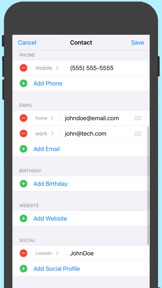
QR Me - Contact allows you to create your own personalized QR Codes to share your contact information quickly and easily with anyone. Simply have the other person scan your QR Code with their phone's camera and your contact will appear in their contact book.
CONTACT FIELDS
You can add the following information to your contact:
• First and Last Name
• Job Title, Department, Company
• Phone Number(s)
• Email(s)
• Birthday
• Website(s)
• Social Media Profiles
• Postal Address(es)
• Nickname, Middle Name, Maiden Name
• Prefix, Suffix
• Phonetic First, Middle, and Last Names
• Notes
LABELED FIELDS
For phone numbers, emails, websites, and postal addresses, you can add labels to specify which ones are for work, home, etc.
Choose between some default suggested labels or create your own custom labels.
SOCIAL MEDIA FIELDS
Sharing your social media accounts has never been easier. Just select (or write in) a platform and add your username. If you chose one of the social media platforms listed in the app, people who save your contact to their phone can click on the field and get redirected straight to your profile.
SHARING YOUR CONTACT
When you want to share your contact with someone, all they have to do is open their camera (iOS 11.2 or later) and hold their phone over your QR Code. They don't even need to have this app installed. It just works!
FOCUSED ON PRIVACY
All of your contact information is stored locally on your own device. No internet connection is required to share your contact.
PROFESSIONAL BRANDING UPGRADE
With this in-app-purchase, you'll unlock the following features:
• MULTIPLE QR CODES - Generate as many QR Codes as you need for various purposes – business, personal, school, and more.
• CUSTOMIZE COLORS - Set the colors of the QR Code to match your branding.
• LOGO OVERLAY - Add your logo atop the QR Code for a personalized touch that boosts brand recognition (note: the logo is *not* transferred with the contact as a profile picture).
Privacy Policy: www.chasecarnaroli.com/qrme/privacy
Terms of Use: www.chasecarnaroli.com/qrme/tos

Neue Funktionen von Version 3.7

• Resolved an issue where contacts wouldn’t load on iOS 18.3
• The logo overlay cropper tool is now full screen for a smoother logo-editing experience

Anbieter

Name

Chase Carnaroli

Informationen

Entwickler

Kategorien

Version

3.7

Größe

7,3 MB

Game Center

Nein

VPP Device Licensing

Ja

Bewertung

Altersfreigabe: 4+

Kompatibilität

iOS 15.0 oder neuer

Geräte

iPhone 5s, iPhone 6, iPhone 6 Plus, iPhone 6s, iPhone 6s Plus, iPhone SE, iPhone 7, iPhone 7 Plus, iPhone 8, iPhone 8 Plus, iPhone X, iPhone XR, iPhone XS, iPhone XS Max, iPhone 11, iPhone 11 Pro, iPhone 11 Pro Max, iPhone SE (2. Generation), iPhone 12, iPhone 12 Pro, iPhone 12 Pro Max, iPhone 12 mini, iPhone 13, iPhone 13 Pro, iPhone 13 Pro Max, iPhone 13 mini, iPhone SE (3. Generation), iPhone 14, iPhone 14 Plus, iPhone 14 Pro, iPhone 14 Pro Max, iPhone 15, iPhone 15 Plus, iPhone 15 Pro, iPhone 15 Pro Max, iPhone 16, iPhone 16Plus, iPhone 16Pro, iPhone 16ProMax, iPad (5. Generation) Wi-Fi, iPad (5. Generation) Wi-Fi + Cellular, iPad (6. Generation) Wi-Fi, iPad (6. Generation) Wi-Fi + Cellular, iPad Pro, iPad Pro (Cellular), iPad Pro (9,7 Zoll), iPad Pro (9,7 Zoll) (Cellular), iPad Pro (12,9", 2. Generation), iPad Pro (12,9", 2. Generation) Wi-Fi + Cellular, iPad Pro (10,5"), iPad Pro (10,5") Wi-Fi + Cellular, iPad Pro (11"), iPad Pro (11") Wi-Fi + Cellular, iPad Pro (12,9", 3. Generation), iPad Pro (12,9", 3. Generation) Wi-Fi + Cellular, iPad Air, iPad Air (Cellular), iPad Air 2, iPad Air 2 (Cellular), iPad Air (3. Generation), iPad Air (3. Generation) Wi-Fi + Cellular, iPad mini Retina, iPad mini Retina (Cellular), iPad mini 3, iPad mini 3 (Cellular), iPad mini 4, iPad mini 4 (Cellular), iPad mini (5. Generation), iPad mini (5. Generation) Wi-Fi + Cellular, iPad (7. Generation) Wi-Fi + Cellular, iPad Pro 11" (2. Generation), iPad Pro 11" (2. Generation) Wi-Fi + Cellular, iPad Pro 12,9" (4. Generation), iPad Pro 12,9" (4. Generation) Wi-Fi + Cellular, iPad Air (4. Generation) (Wi-Fi), iPad Air (4. Generation) (Wi-Fi + Cellular), iPad (8. Generation) Wi-Fi, iPad (8. Generation) Wi-Fi + Cellular, iPad Pro 11" (3. Generation), iPad Pro 11" (3. Generation) Wi-Fi + Cellular, iPad Pro 12,9" (5. Generation), iPad Pro 12,9" (5. Generation) Wi-Fi + Cellular, iPad (9. Generation), iPad (9. Generation) Wi-Fi + Cellular, iPad mini (6. Generation), iPad mini (6. Generation) Wi-Fi + Cellular, iPad Air (5. Generation), iPad Air (5. Generation) Wi-Fi + Cellular, iPad Pro 11" (4. Generation), iPad Pro 11" (4. Generation) Wi-Fi + Cellular, iPad Pro (12,9", 6. Generation), iPad Pro (12,9", 6. Generation) Wi-Fi + Cellular, iPad (10. Generation), iPad (10. Generation) Wi-Fi + Cellular, iPad Air (11″, M2, Wi-Fi), iPad Air (13″, M2, Wi-Fi), iPad Air (13″, M2, Wi-Fi + Cellular), iPad Pro (11″, M4, Wi-Fi), iPad Pro (11″, M4, Wi-Fi + Cellular), iPad Pro (13″, M4, Wi-Fi), iPad Pro (13″, M4, Wi-Fi + Cellular), iPad MiniA17Pro, iPad MiniA17ProCellular, iPod touch (6. Generation), iPod touch (7. Generation)

Sprachen

Englisch

App Store: Kundenbewertungen

Bewertungen & Rezensionen

4,5 von 5 (5 Bewertungen)

App Store: Kundenrezensionen

2023-11-29

Alles Top

Klein, fein, einfach super! Alles selbsterklärend, ohne Werbung, etwas asketisch, dafür ideal für Business, die App erfüllt bestens ihre Funktion!
akovpak
Version 2.6
2021-03-22

Does one thing

… and does it well.
Carlo Z.
Version 2.0