
InfoBedingungenDatenschutzKontakt
 
Wird aktualisiert
MetroView GPS Navigation

MetroView GPS Navigation

Veröffentlicht: 2010-05-07
© MetroView Systems Pty Ltd 2014
MetroView GPS Navigation - QR Code
Version 3.0.1
4+
Laden im App Store
Version 3.0.1
4+
Laden im App Store
Veröffentlicht: 2010-05-07
© MetroView Systems Pty Ltd 2014

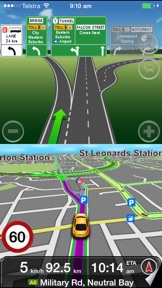
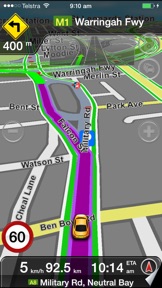
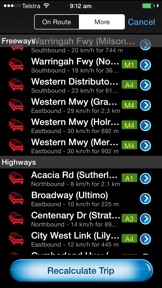
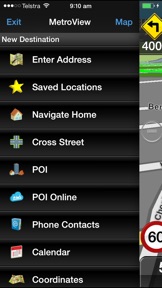
iPhone Screenshots

Screenshot
Screenshot
Screenshot
Screenshot

iPad Screenshots

Screenshot
Screenshot

Beschreibung

A complete Turn-By-Turn Navigation solution with Australia and New Zealand's most comprehensive SpeedAlert that will save your license!!
Free Australia and NZ offline map updates.
Speed Alert - Licence saving national coverage for speed limits including speed, school zones and time of day.
HERE live traffic available via In App purchase.
Natural Voice Guidance - "Turn left at McDonalds." "Turn right just after the BP Petrol Station."
The only navigation app developed in Australia. This navigation app is customised for Australian/NZ driving and better than the more expensive alternatives!
A simple to use, detailed navigation app with spoken instructions designed specifically for the iPhone and iPad. Supports landscape and portrait views. Tested for the new iPad and iPhone 6s - full support for the high resolution screens.
NO Internet connection required - comprehensive ALL AUSTRALIA & NZ map data stored offline within the app.
Regular free ongoing map updates.
A few users experience GPS accuracy issues. Most are fixed by a GPS reset - to do this hold down power and home buttons for about 10 seconds until your device reboots.
See http://www.facebook.com/metroview for more pictures and information.
Key Features
Live Traffic updates via In App purchase - See here.com for coverage.
High quality spoken turn instructions including spoken street names and Australian accented male and female voice options.
Speed Alert - Licence saving national coverage for alerts including speed, school zones and time of day.
Ipod music control
Contacts search
Boating mode - a basic boating mode including speed in Knots
POI search using locally stored data and Google Local Search (requires internet connection).
Location sharing
Individual house numbering displayed - based on official government database.
Regular map improvements.
Standard Features
No ongoing subscription costs, FREE to use after initial purchase.
All Australia and NZ map data stored on phone - no download costs for mapping or navigation.
The same application can be used on all iPhone models and iPad.
Map Release 2015 Q4 including reported map improvements.
To report a map improvement, go to: http://www.metroview.com.au/dataquery.php
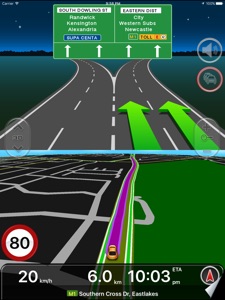
Advanced lane guidance - know which lane to be in at major junctions.
Analogue and digital speedo views.
High quality spoken street names including Australian accented male and female voice options.
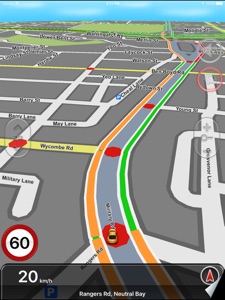
Familiar map design.
Walking mode including compass functionality to point you in a straight line to your destination.
Proudly Australian made and supported.
A windscreen or dashboard mount is recommended. MetroView Australia supports the TomTom Car Kit for iPod and iPhone.
Please Note:
Continued use of GPS running in the background can dramatically decrease battery life.
Some devices require an external GPS receiver. Please confirm your device includes a GPS.

Neue Funktionen von Version 3.0.1

All Australia and NZ map update: Q4 2017
iPhone X ready

Anbieter

Name

MetroView Systems Pty Ltd

Informationen

Kategorien

Version

3.0.1

Größe

1.343,1 MB

Game Center

Nein

VPP Device Licensing

Ja

Bewertung

Altersfreigabe: 4+

Kompatibilität

iOS 6.0 oder neuer

Geräte

iPhone 11, iPad mini Retina, iPad Air, iPad mini 4 (Cellular), iPad mini 3, iPad mini (5. Generation), iPad Pro (11") Wi-Fi + Cellular, iPad (5. Generation) Wi-Fi + Cellular, iPad (6. Generation) Wi-Fi + Cellular, iPad Pro, iPad mini (5. Generation) Wi-Fi + Cellular, iPad Pro (12,9", 3. Generation), iPod touch (6. Generation), iPad mini Retina (Cellular), iPad Air (Cellular), iPad Air 2 (Cellular), iPad mini 4, iPad Pro (12,9", 3. Generation) Wi-Fi + Cellular, iPad Pro (12,9", 2. Generation), iPad (5. Generation) Wi-Fi, iPad Air (3. Generation) Wi-Fi + Cellular, iPad Pro (Cellular), iPad Pro (12,9", 2. Generation) Wi-Fi + Cellular, iPhone 8 Plus, iPad Pro (9,7 Zoll), iPhone XR, iPad Air 2, iPad (6. Generation) Wi-Fi, iPad Air (3. Generation), iPhone 8, iPad Pro (10,5") Wi-Fi + Cellular, iPhone 6s, iPad Pro (9,7 Zoll) (Cellular), iPhone 7, iPhone 7 Plus, iPhone XS Max, iPhone 6, iPhone X, iPhone 6 Plus, iPhone XS, iPad Pro (10,5"), iPhone SE, iPhone 5s, iPhone 6s Plus, iPod touch (7. Generation), iPad mini 3 (Cellular), iPad Pro (11")

Sprachen

Englisch

App Store: Kundenbewertungen

Bewertungen & Rezensionen

0,0 von 5 (Keine Bewertung)

App Store: Kundenrezensionen

2011-08-21

Super Navi - Gans ohne Maps (und ohne Gebühren) in Down Under unterwegs

Kann der Kritik einiger weniger Nutzer ganz und gar nicht zustimmen. Wollte die App in D nicht bewerten, da ich sie für ein Nischenprodukt für Deutsche hielt. Nun aber aufgrund der Kritik einiger Anderer Nutzer nun dennoch.
1) Hatte erst bedenken, ob nicht doch Roaming-Gebühren in Down Under entstehen - ist nix passiert, obwohl man den Flight-Modus a, iPhone nicht einschalten kann (dann funktioniert die App nicht). Es wurden in meinem Fall aber keine Daten übertragen und somit sind auch über Wochen Nutzung hinweg keine Roaming-Gebhren angefallen.
2) Habe die Software 3 Wochen im Raum Melbourne - City bis Lake Eildon, Halls Gap, Wilsons Prom, Ottway NP genutzt. Niemals Probleme gehabt (nur mit dem Zigarettenanzünder des Mietwagens der nicht funzte). Immer gut geleitet an jedes Ziel gelangt! Musste fast nie aufs Display schauen, da die Ansagen sehr präzise sind.
3) Die Routenplanung war bei der Vorversion kaum gegeben (einziger Nachteil) - vielleicht wurden entsprechende Funktionen ja jetzt ergänzt…
4) Da Toll-Ways ausgeschlossen werden können, gerät man als Nicht-Aussie auch nicht unfreiwillig auf kostenpflichtige Straßen - das war in Melbourne definitiv von Vorteil, da dort eben solche Straßen auch nicht selten sind.
Trotz leichter Kritik (Pkt. 3) gebe ich der App aufgrund der Zuverlässigkeit die volle Punktzahl. Selbst meine australischen Verwandten waren positiv überrascht. Für alle Reisenden nach Down Under ein echter Kauftip! Auch für jene, die das Dritte oder vierte Mal reisen ein "Must Have". Wenn ich daran denke, wie viele Karten wir schon gekauft haben… Vor Ort (in Nationalparks o. ä.) ist man zum Wandern, Radfahren etc. eh auf Spezialkarten angewiesen.
abittne
Version 1.4.58
2011-01-23

Schlecht

Hat nicht einmal richtig funktioniert während meiner Australien-Rundreise. Rausgeworfenes Geld. Diese App tut nicht das, was ein Navi tun sollte.
ava06
Version 1.3.4