InfoBedingungenDatenschutzKontakt
 
Wird aktualisiert
Classroom Timer Pro

Classroom Timer Pro

Veröffentlicht: 2013-01-30
© Edtech Monster Limited
Classroom Timer Pro - QR Code
Version 2.5
4+
Laden im App Store
Version 2.5
4+
Laden im App Store
Veröffentlicht: 2013-01-30
© Edtech Monster Limited

iPhone Screenshots

Screenshot
Screenshot
Screenshot
Screenshot
Screenshot
Screenshot
Screenshot
Screenshot
Screenshot
Screenshot

iPad Screenshots

Screenshot
Screenshot
Screenshot
Screenshot
Screenshot
Screenshot
Screenshot
Screenshot
Screenshot
Screenshot

Beschreibung

A Simple, Fun Timer, designed for teachers - or anyone else who needs to set timed tasks for groups of children in a classroom or similar environment.
Classroom Timer Pro includes the following features:
• To keep things fresh there are over 50 Alarm clock / Background theme combinations (with more to come!)
• The app can continue to countdown in the background, so you can switch between applications during the countdown. This is configurable in the apps settings screen.
• No Adverts from third parties.
• Displays the amount of time elapsed on the main app screen, as well as the amount of time left -this can be enabled / disabled from the settings screen.
• Show the actual time on the main app screen - this can be enabled / disabled from the settings screen.
How does it work?
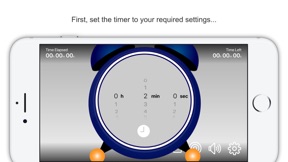
The user sets the target amount of time for the class/group to perform a particular task. The countdown timer is then started. The timer can be viewed from the Apple device itself or displayed on a larger format device such as an interactive board or TV screen using screen mirroring features of the Apple Devices.
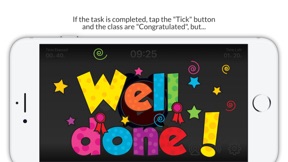
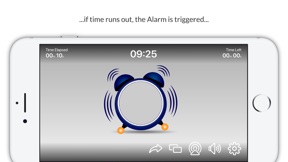
If the class completes the task in the defined time limit the teacher can tap the "tick" button and the "Well Done" screen is displayed and a fanfare sound effect is played. However, if the class run out of time the Alarm rings on the clock, the clock bounces around the screen. Then either:
1. The clock explodes in a comic fashion or
2. A "Time's Up" animation is displayed.
... simply select which effect is used.
This app really encourages students to complete any assigned task, the students can see graphically how much time they have left to complete the task.
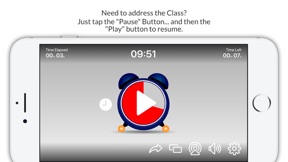
The user is able to pause, restart and reset the timer at any time. The app has an audible "ticking" sound when the timer is running, this can be enabled or disabled by tapping the speaker button on the apps main screen. The Fanfare and Explosion sound effects can be controlled via the audio controls on the Apple device.
This is a simple but fun and engaging app to assist the teacher in their classroom management activities.
As with all our apps, users are able to send feedback, make enhancement requests or report any issues directly to us from inside the app.

Neue Funktionen von Version 2.5

We have listened to feedback from Teachers and made some enhancements to the app based on that. Please keep the feedback coming, we want to make the app as useful as possible.
We have also squashed a few bugs!

Anbieter

Name

EDTECH MONSTER LIMITED

URL

Informationen

Kategorien

Version

2.5

Größe

112,4 MB

Game Center

Nein

VPP Device Licensing

Ja

Bewertung

Altersfreigabe: 4+

Kompatibilität

iOS 9.0 oder neuer

Geräte

iPhone 4S, iPhone 5, iPhone 5c, iPhone 5s, iPhone 6, iPhone 6 Plus, iPhone 6s, iPhone 6s Plus, iPhone SE, iPhone 7, iPhone 7 Plus, iPhone 8, iPhone 8 Plus, iPhone X, iPhone XR, iPhone XS, iPhone XS Max, iPhone 11, iPhone 11 Pro, iPhone 11 Pro Max, iPhone SE (2. Generation), iPhone 12, iPhone 12 Pro, iPhone 12 Pro Max, iPhone 12 mini, iPhone 13, iPhone 13 Pro, iPhone 13 Pro Max, iPhone 13 mini, iPhone SE (3. Generation), iPhone 14, iPhone 14 Plus, iPhone 14 Pro, iPhone 14 Pro Max, iPhone 15, iPhone 15 Plus, iPhone 15 Pro, iPhone 15 Pro Max, iPhone 16, iPhone 16 Plus, iPhone 16 Pro, iPhone 16 Pro Max, iPhone 16e, iPhone 17, iPhone 17Pro, iPhone 17ProMax, iPhone Air, iPad 2 (Wi-Fi), iPad 2 (3G), iPad (3. Generation) (Wi-Fi), iPad (3. Generation) (4G), iPad (4. Generation) (Wi-Fi), iPad (4. Generation) (4G), iPad (5. Generation) Wi-Fi, iPad (5. Generation) Wi-Fi + Cellular, iPad (6. Generation) Wi-Fi, iPad (6. Generation) Wi-Fi + Cellular, iPad Pro, iPad Pro (Cellular), iPad Pro (9,7 Zoll), iPad Pro (9,7 Zoll) (Cellular), iPad Pro (12,9", 2. Generation), iPad Pro (12,9", 2. Generation) Wi-Fi + Cellular, iPad Pro (10,5"), iPad Pro (10,5") Wi-Fi + Cellular, iPad Pro (11"), iPad Pro (11") Wi-Fi + Cellular, iPad Pro (12,9", 3. Generation), iPad Pro (12,9", 3. Generation) Wi-Fi + Cellular, iPad Air, iPad Air (Cellular), iPad Air 2, iPad Air 2 (Cellular), iPad Air (3. Generation), iPad Air (3. Generation) Wi-Fi + Cellular, iPad mini (Wi-Fi), iPad mini (4G), iPad mini Retina, iPad mini Retina (Cellular), iPad mini 3, iPad mini 3 (Cellular), iPad mini 4, iPad mini 4 (Cellular), iPad mini (5. Generation), iPad mini (5. Generation) Wi-Fi + Cellular, iPad (7. Generation) Wi-Fi + Cellular, iPad Pro 11" (2. Generation), iPad Pro 11" (2. Generation) Wi-Fi + Cellular, iPad Pro 12,9" (4. Generation), iPad Pro 12,9" (4. Generation) Wi-Fi + Cellular, iPad Air (4. Generation) (Wi-Fi), iPad Air (4. Generation) (Wi-Fi + Cellular), iPad (8. Generation) Wi-Fi, iPad (8. Generation) Wi-Fi + Cellular, iPad Pro 11" (3. Generation), iPad Pro 11" (3. Generation) Wi-Fi + Cellular, iPad Pro 12,9" (5. Generation), iPad Pro 12,9" (5. Generation) Wi-Fi + Cellular, iPad (9. Generation), iPad (9. Generation) Wi-Fi + Cellular, iPad mini (6. Generation), iPad mini (6. Generation) Wi-Fi + Cellular, iPad Air (5. Generation), iPad Air (5. Generation) Wi-Fi + Cellular, iPad Pro 11" (4. Generation), iPad Pro 11" (4. Generation) Wi-Fi + Cellular, iPad Pro (12,9", 6. Generation), iPad Pro (12,9", 6. Generation) Wi-Fi + Cellular, iPad (10. Generation), iPad (10. Generation) Wi-Fi + Cellular, iPad Air (11″, M2, Wi-Fi), iPad Air (13″, M2, Wi-Fi), iPad Air (13″, M2, Wi-Fi + Cellular), iPad Pro (11″, M4, Wi-Fi), iPad Pro (11″, M4, Wi-Fi + Cellular), iPad Pro (13″, M4, Wi-Fi), iPad Pro (13″, M4, Wi-Fi + Cellular), iPad mini (A17 Pro) Wi-Fi, iPad mini (A17 Pro) Wi-Fi + Cellular, iPad (A16) Wi-Fi, iPad (A16) Wi-Fi + Cellular, iPad Air 11" (M3) Wi-Fi, iPad Air 11" (M3) Wi-Fi + Cellular, iPad Air 13" (M3) Wi-Fi, iPad Air 13" (M3) Wi-Fi + Cellular, iPad Pro11M5, iPad Pro11M5Cellular, iPad Pro13M5, iPad Pro13M5Cellular, iPod (5. Generation), iPod touch (6. Generation), iPod touch (7. Generation)

Sprachen

Englisch

App Store: Kundenbewertungen

Bewertungen & Rezensionen

2,0 von 5 (1 Bewertung)

App Store: Kundenrezensionen

2019-10-24

Öffnet sich häufig nicht

Seit ich auf die pro Version umgestiegen bin, öffnet sich die App häufig nicht. Man muss zuerst das ipad neu starten, dass es wieder funktioniert.
So ist die App im Unterricht schlecht zu gebrauchen.
Ich ärgere mich, da dies bei dr lite Versionen nicht vor kam.
Lautrocks
Version 2.2