InfoBedingungenDatenschutzKontakt
 
Wird aktualisiert
Recipe Gallery

Recipe Gallery

Veröffentlicht: 2013-05-21
© Gallery Labs LLC
Recipe Gallery - QR Code
Version 5.1.6
4+
Laden im App Store
Version 5.1.6
4+
Laden im App Store
Veröffentlicht: 2013-05-21
© Gallery Labs LLC

iPhone Screenshots

Screenshot
Screenshot
Screenshot
Screenshot
Screenshot

iPad Screenshots

Screenshot
Screenshot
Screenshot
Screenshot
Screenshot

Beschreibung

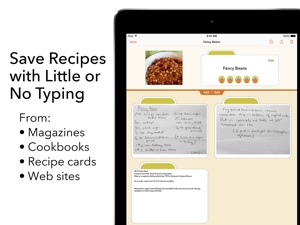
Save any recipe from magazines, cookbooks, recipe cards, and Web sites in less than a minute with little or no typing. Recipe Gallery is the fastest and most convenient way to save, find and use the recipes you love. Recipe Gallery uses the camera of your iPhone or iPad along with modern optical character recognition (OCR) to capture, index, and store recipes in an easy to search and use image format. It also captures and saves recipes from the Web, making them a permanent part of your gallery.
Quickly save any recipe in one convenient format and place. Then find the recipe you need with a simple search that looks through the recipe name, ingredients, instructions, and any additional notes you've made. All your recipes are accessible even when you have no internet connection. As an iCloud enabled app on both the iPhone and iPad, you can view or capture a recipe at any time and still have large easy to read recipes on your iPad in the kitchen. You can print your recipes, and sharing them is easy with a simple tap and email. You can also share recipes directly with other Recipe Gallery users via AirDrop or email.
Store as many notes as you want along with any recipe. Save notes like nutritional information, alterations and improvements, or the date you served it last. All the notes are searchable and easy to edit.
• Little or no typing, capture a recipe in seconds with the iPhone or iPad camera
• Built in Web browser to capture recipes from the Web
• Quickly add recipe bookmarks to Recipe Gallery while browsing in Safari
• Type recipes from scratch, dictate them, or copy and paste text from other apps
• Search for ingredients, even for recipes captured with the camera
• iCloud support for recipe sync between devices and also provides a safe backup of your recipes
• Annotate your recipe images with text, highlights, arrows and more
• One app runs on your iPhone, iPad and iPod Touch, nothing more to buy
• Simple to understand help videos to get you started quickly
• Import PDF files from the Web, email, or any place your iOS device can access
• Create custom categories and arrange them in any order you wish
• Assign your recipes to multiple categories and view them sorted by name, date or rating
• Automatic OCR indexing of recipes
• Share recipes via email, AirDrop or print directly from your iPhone or iPad
• Full multitasking support of Slide Over and Split View on the newer iPads and iPad Pros
• Three color themes

Neue Funktionen von Version 5.1.6

Fixed and issue that could cause the search keyboard to be hidden.

Anbieter

Name

Mike Davey

Informationen

Entwickler

Kategorien

Version

5.1.6

Größe

33,6 MB

Game Center

Nein

VPP Device Licensing

Ja

Bewertung

Altersfreigabe: 4+

Kompatibilität

iOS 13.0 oder neuer

Geräte

iPhone 5s, iPhone 6, iPhone 6 Plus, iPhone 6s, iPhone 6s Plus, iPhone SE, iPhone 7, iPhone 7 Plus, iPhone 8, iPhone 8 Plus, iPhone X, iPhone XR, iPhone XS, iPhone XS Max, iPhone 11, iPhone 11 Pro, iPhone 11 Pro Max, iPhone SE (2. Generation), iPhone 12, iPhone 12 Pro, iPhone 12 Pro Max, iPhone 12 mini, iPhone 13, iPhone 13 Pro, iPhone 13 Pro Max, iPhone 13 mini, iPhone SE (3. Generation), iPhone 14, iPhone 14 Plus, iPhone 14 Pro, iPhone 14 Pro Max, iPhone 15, iPhone 15 Plus, iPhone 15 Pro, iPhone 15 Pro Max, iPad (5. Generation) Wi-Fi, iPad (5. Generation) Wi-Fi + Cellular, iPad (6. Generation) Wi-Fi, iPad (6. Generation) Wi-Fi + Cellular, iPad Pro, iPad Pro (Cellular), iPad Pro (9,7 Zoll), iPad Pro (9,7 Zoll) (Cellular), iPad Pro (12,9", 2. Generation), iPad Pro (12,9", 2. Generation) Wi-Fi + Cellular, iPad Pro (10,5"), iPad Pro (10,5") Wi-Fi + Cellular, iPad Pro (11"), iPad Pro (11") Wi-Fi + Cellular, iPad Pro (12,9", 3. Generation), iPad Pro (12,9", 3. Generation) Wi-Fi + Cellular, iPad Air, iPad Air (Cellular), iPad Air 2, iPad Air 2 (Cellular), iPad Air (3. Generation), iPad Air (3. Generation) Wi-Fi + Cellular, iPad mini Retina, iPad mini Retina (Cellular), iPad mini 3, iPad mini 3 (Cellular), iPad mini 4, iPad mini 4 (Cellular), iPad mini (5. Generation), iPad mini (5. Generation) Wi-Fi + Cellular, iPad (7. Generation) Wi-Fi + Cellular, iPad Pro 11" (2. Generation), iPad Pro 11" (2. Generation) Wi-Fi + Cellular, iPad Pro 12,9" (4. Generation), iPad Pro 12,9" (4. Generation) Wi-Fi + Cellular, iPad Air (4. Generation) (Wi-Fi), iPad Air (4. Generation) (Wi-Fi + Cellular), iPad (8. Generation) Wi-Fi, iPad (8. Generation) Wi-Fi + Cellular, iPad Pro 11" (3. Generation), iPad Pro 11" (3. Generation) Wi-Fi + Cellular, iPad Pro 12,9" (5. Generation), iPad Pro 12,9" (5. Generation) Wi-Fi + Cellular, iPad (9. Generation), iPad (9. Generation) Wi-Fi + Cellular, iPad mini (6. Generation), iPad mini (6. Generation) Wi-Fi + Cellular, iPad Air (5. Generation), iPad Air (5. Generation) Wi-Fi + Cellular, iPad Pro 11" (4. Generation), iPad Pro 11" (4. Generation) Wi-Fi + Cellular, iPad Pro (12,9", 6. Generation), iPad Pro (12,9", 6. Generation) Wi-Fi + Cellular, iPad (10. Generation), iPad (10. Generation) Wi-Fi + Cellular, iPod touch (6. Generation), iPod touch (7. Generation)

Sprachen

Englisch

App Store: Kundenbewertungen

Bewertungen & Rezensionen

4,0 von 5 (6 Bewertungen)

App Store: Kundenrezensionen

2013-06-04

nett gemacht aber wenig Zusatzfunktionen

Die App ist gut zum einfachen Archivieren und optisch ansprechend. Auch die integrierte Texterkennung ist eine gute Sache, allerdings stört mich, dass man keine Kategorien erstellen kann und so wenig Möglichkeiten zum Sortieren hat! Das Preis-Leistungsverhältnis ist aber absolut in Ordnung.
Bine165
Version 1.0