Wird aktualisiert


iPhone Screenshots


iPad Screenshots


Beschreibung
PocketFiles is the ultimate app to keep your photos, videos and documents locked and hidden: Photo Vault, Private Web Browser with file downloader, Media Player and File Manager all in one incredibly simple app.
Reviews:
***** "This app crushes the competition. It’s sleek, easy to get to grips with and... the safety and protective features on Pocket Files are excellent."
***** "Rambax brings features to the table that NOBODY else seems to have including the big boys like OneDrive, Google Drive, Apple Files app. The thing is, all of other apps have SOME of the features on Pocket Files, but not all."
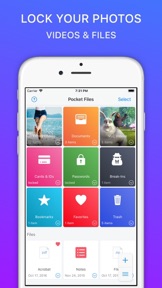
Easily import your photos from your device, private web browser or computer, create new folders/subfolders and notes. Set a passcode for the app or folders and catch any intruder’s picture with their GPS location who attempt to break-in to your app.
◉ Vault
- Create multiple vaults to store entirely different files and folders (decoy, home, work etc) by entering different passcodes
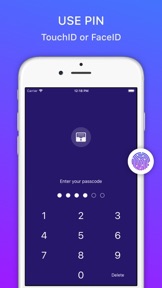
- Set PIN using 4 to 8 digits
- Lock any folder using password, FaceID or TouchID for extra security
- Panic Action: quickly switch to other vaults or Safari, Music, Mail and Messages app by simply swiping the screen
- Break-in report: catch photo and location of any intruder who tries to break-in to your app
◉ File Manager
- Simple and elegant interface to store and view photos, videos and files
- Create new folders/subfolders (or albums) and notes
- Custom folder/file cover (choose from images, video frame or many built-in icons)
- Import or export files from your Computer wirelessly or using iTunes Sharing
- Use your personal clouds (iCloud Drive, Dropbox, OneDrive) or import from iOS Files app (Google Drive and more)
- Import and view Live Photos or convert to video or photo
- Share extension: import files directly from Safari, Photos and other apps
- Search and tag files, sort by dates, name or size
- View photos, videos, animated GIFs, PDF, ZIP, Microsoft Office documents or iWork files
- Zip and unzip files with passwords
- Take photos directly within the app
- Recover deleted files using Trash folder
- Mark files as favorite for quick access
◉ Media Player
- Play all popular audio and video formats:
AVI, DAT, DIVX, FLAC, FLV, F4V, WMV, VOB, WEBM, RM, RAM, VGM, VGZ, MKA, MKV, OGG, OGM, PVA, MTS, M2TS, DVR-MS, MPC, AMR, AU, ASF, DTS and more
- Supports gestures: swipe left and right to move media position, swipe up and down to adjust volume and double-tap to pause/resume
- Speed control, scrub, shuffle, repeat and video gravity controls
- Ability to play audio and videos files in background
- Supports MP3 artwork and metadata
◉ Private Web Browser
- Multiple tab support
- Automatically delete browsing history and data when you close the browser
- Built-in file and photo downloader
◉ Slideshow photos with customized settings (transitions, slide time, loop or shuffle)
◉ Quickly edit photos (crop and rotation)
◉ Easily access and share stored files via iMessage
◉ Dark Theme and more...
Pocket Files Premium Subscription:
If you choose to purchase Pocket Files Premium, payment will be charged to your iTunes account, and your account will be charged for renewal 24 hours prior to the end of the current period. Auto-renewal may be turned off at any time by going to your settings in the iTunes Store after purchase. Current price for Pocket Files Premium is $9.99 USD per year and may vary from country to country.
Terms of Service:
http://rambax.com/pocketfiles/termsofservice
Privacy policy:
http://rambax.com/pocketfiles/privacypolicy
Neue Funktionen von Version 5.5.1
- New App Icon
- Added new App Icons to choose from inside the app
- Bug fixes and improvements
5.5.1:
- Fixed an issue with the new app icon
Anbieter
Name
Rambax, LLC
Informationen
Entwickler
Kategorien
Version
5.5.1
Größe
67,2 MB
Game Center
Nein
VPP Device Licensing
Ja
Bewertung
Freigabe 17+ für Folgendes:
Unbeschränkter Zugang zum Web
Kompatibilität
iOS 10.0 oder neuer
Geräte
iPhone 7, iPhone 8, iPhone 6s, iPhone XS, iPhone XS Max, iPhone SE, iPhone X, iPhone 6s Plus, iPad Pro (11"), iPad (6. Generation) Wi-Fi, iPad Pro (11") Wi-Fi + Cellular, iPad Pro (12,9", 2. Generation), iPad Pro (12,9", 3. Generation) Wi-Fi + Cellular, iPad (5. Generation) Wi-Fi, iPad Air (3. Generation) Wi-Fi + Cellular, iPhone 6, iPad mini 4, iPad Air 2, iPad Air (3. Generation), iPhone 5s, iPad Pro (10,5"), iPhone XR, iPad Pro (12,9", 3. Generation), iPhone 7 Plus, iPhone 6 Plus, iPhone 8 Plus, iPad Air 2 (Cellular), iPad mini 3, iPad mini Retina (Cellular), iPad mini 4 (Cellular), iPad Pro, iPad Pro (12,9", 2. Generation) Wi-Fi + Cellular, iPad mini (5. Generation) Wi-Fi + Cellular, iPad Pro (10,5") Wi-Fi + Cellular, iPhone 11 Pro Max, iPod touch (7. Generation), iPad mini (5. Generation), iPad Pro (9,7 Zoll) (Cellular), iPod touch (6. Generation), iPad Pro (Cellular), iPad (6. Generation) Wi-Fi + Cellular, iPad Pro (9,7 Zoll), iPhone 11 Pro, iPhone 11, iPad (5. Generation) Wi-Fi + Cellular, iPod touch SeventhGen
Sprachen
Englisch
App Store: Kundenbewertungen
Bewertungen & Rezensionen
5,0 von 5 (3 Bewertungen)
App Store: Kundenrezensionen
Kein Eintrag