Wird aktualisiert


iPhone Screenshots
Beschreibung
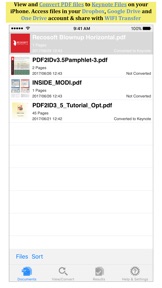
PDF to Keynote by PDF2Office converts your PDF to editable Keynote files on your iPhone.
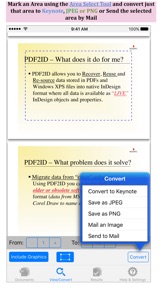
Convert PDF to Keynote; Convert PDF to JPEG; Convert PDF to PNG and mark specific areas to convert using the Area Select tool and have it editable on your iPhone!
PDF to Keynote converts PDF files to editable Keynote files by recreating the intended construction and layout of the document; forming paragraphs; applying styles; regrouping independent graphic elements; extracting images; creating tables; all automatically without any manual intervention.
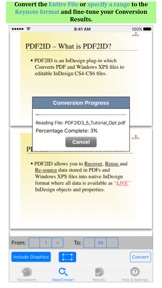
PDF to Keynote also provides detailed options for fine-tuning the conversion process. You can convert the entire PDF file or specify a range of pages to convert to the Keynote format. Every page in a PDF file is converted to an equivalent slide in the resulting Keynote file. PDF to Keynote comes with a fully integrated PDF viewer allowing you to view the file you want to convert.
Features
* Convert PDFs to editable Keynote files
* Read PDF Files using the integrated PDF viewer.
* Mark just the area within a page to convert. You can convert just the marked area to Keynote, JPEG or PNG types
* Select an area and have the contents embedded into a new Mail automatically.
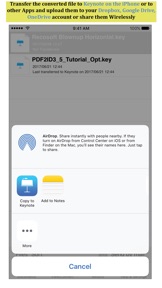
* Dropbox integration allows you to transfer files between your Dropbox account
* Use WIFI transfer mode to transfer files between your computer and iPhone
* Use standard Pinch in/Pinch Out to change the viewing magnification
* Use the all in 1 interface to Convert and View PDF files.
* The converted result is easily editable in Keynote
* Transfer your converted files to any other software on the iPhone that can accept Keynote files.
* Convert the entire file or a range of pages only
Recosoft is the developer of PDF2Office the de-facto PDF conversion software for the Mac and iPad; PDF2ID the PDF-to-InDesign converter and ID2Office, the InDesign to Word/PowerPoint tool. Refer to our web site to view the entire desktop line of products that we are now bringing to the iOS.
Note: PDF to Keynote by PDF2Office does not perform Optical Character Recognition. An image in a PDF file is treated as an image.
Neue Funktionen von Version 1.5.1
- Fully supports iOS 10.x
- Added support for Google Drive
- Added support for OneDrive
- 64-bit application
- Added support for PDF thumbnail preview in the Files area
- Fixed many bugs and improved stability of the product
Anbieter
Informationen
Entwickler
Kategorien
Version
1.5.1
Größe
25,5 MB
Game Center
Nein
VPP Device Licensing
Ja
Bewertung
Altersfreigabe: 4+
Kompatibilität
iOS 9.0 oder neuer
Geräte
iPad mini Retina (Cellular), iPad mini 4 (Cellular), iPad mini 3, iPad Pro (11"), iPad Air 2, iPad (6. Generation) Wi-Fi, iPad (5. Generation) Wi-Fi, iPad Pro (12,9", 2. Generation), iPad Pro (11") Wi-Fi + Cellular, iPad (5. Generation) Wi-Fi + Cellular, iPad Pro (12,9", 3. Generation) Wi-Fi + Cellular, iPad mini (5. Generation) Wi-Fi + Cellular, iPad Pro (12,9", 3. Generation), iPad Air (3. Generation), iPad Pro (12,9", 2. Generation) Wi-Fi + Cellular, iPad Air (3. Generation) Wi-Fi + Cellular, iPad Pro (10,5") Wi-Fi + Cellular, iPhone 6 Plus, iPhone 6s, iPhone 8 Plus, iPhone 8, iPad Pro (Cellular), iPad Pro (9,7 Zoll) (Cellular), iPad Pro (9,7 Zoll), iPhone 6s Plus, iPhone 5s, iPhone 7, iPhone 7 Plus, iPhone X, iPhone XR, iPhone SE, iPhone 6, iPhone XS Max, iPad Pro (10,5"), iPhone XS, iPad mini (5. Generation), iPad (6. Generation) Wi-Fi + Cellular, iPad Pro, iPod touch (6. Generation), iPad Air 2 (Cellular), iPad mini 4
Sprachen
Englisch
App Store: Kundenbewertungen
Bewertungen & Rezensionen
0,0 von 5 (Keine Bewertung)
App Store: Kundenrezensionen
Kein Eintrag