InfoBedingungenDatenschutzKontakt
 
Wird aktualisiert
spectrum eye RTA

spectrum eye RTA

Veröffentlicht: 2018-06-01
© 2018 Oleg Naumenko
spectrum eye RTA - QR Code
Version 1.3.3
4+
Laden im App Store
Version 1.3.3
4+
Laden im App Store
Veröffentlicht: 2018-06-01
© 2018 Oleg Naumenko

iPhone Screenshots

Screenshot
Screenshot
Screenshot
Screenshot

iPad Screenshots

Screenshot
Screenshot
Screenshot

Beschreibung

For music professionals, audio engineers, sound technicians, sound system installers and audio students.
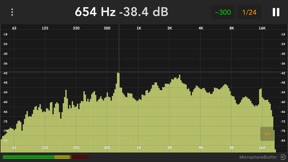
Equally great both for quick reference and for long - term live spectra display. Supports multiple FFT sizes, adjustable averaging time and bandwidth, selectable mic input, selectable plot color.
Main features:
- vide range of frequency resolutions & averaging times
- scalable & movable plot that animates smoothly
- uses the whole audio range even on built-in mic
- selectable input source/mic or external device
With Spectrum-Eye, You can:
- monitor sound quality on concerts,
- ring out feedback in stage monitors,
- find resonances in acoustic environments,
- evaluate spectral properties of audio material in studio,
- develop Your hearing skills (frequency - aware hearing practice),
- detect problematic frequencies in speech/music,
- tune up car sound systems
Supports external microphones & audio interfaces compatible with Your iPad or iPhone. Currently uses sum of input channels 1 & 2.
Allows selecting preferred iPad mic when no external audio input is connected. You will discover how many mics and mic directivity configurations Your device has.
Uses iOS "Audio measurement mode" to bypass built-in mic processing. This setting too can be switched on/off for comparison.
Nominal sampling rate, Hz: 48000
Measurement frequency range, Hz: 8...22000
Measurement magnitude range, dB: 144dB
Magnitude precision, dB: ± 0.2
Frequency resolution (bandwidth):
- 1 octave
- 1/3
- 1/6
- 1/12
- 1/24
- 1/48
- 1/96 (iPad only)
App also employs pink noise generator for cases where You will use it with external audio interfaces. You can use the app as a pink noice generator even when screen is off.
Basic usage tips:
Re-position plot by sliding on scales (frequency scale for moving horizontally, dB scale for moving vertically). Scale the plot horizontally or vertically using two finger pinch.
Slide Your finger over the plot to move the cursor and see it's position in Hz and dB.
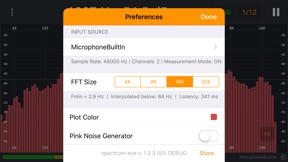
You can also find some tweaks and fine - tunings in Settings, accessible using three-dot button on top left.
The app is in active development, Your suggestions welcome!

Neue Funktionen von Version 1.3.3

- frequency range popup has all frequency labels
- better display of parameters in Settings -> Input source
- sample rate checks for more stable operation
- ready for new 11" & 12.9" iPads!
- more distinct scale labels

Anbieter

Name

Naumenko Oleg

Informationen

Entwickler

Kategorien

Version

1.3.3

Größe

27 MB

Game Center

Nein

VPP Device Licensing

Ja

Bewertung

Altersfreigabe: 4+

Kompatibilität

iOS 9.3 oder neuer

Geräte

iPhone 4S, iPhone 5, iPhone 5c, iPhone 5s, iPhone 6, iPhone 6 Plus, iPhone 6s, iPhone 6s Plus, iPhone SE, iPhone 7, iPhone 7 Plus, iPhone 8, iPhone 8 Plus, iPhone X, iPhone XR, iPhone XS, iPhone XS Max, iPhone 11, iPhone 11 Pro, iPhone 11 Pro Max, iPhone SE (2. Generation), iPhone 12, iPhone 12 Pro, iPhone 12 Pro Max, iPhone 12 mini, iPhone 13, iPhone 13 Pro, iPhone 13 Pro Max, iPhone 13 mini, iPad 2 (Wi-Fi), iPad 2 (3G), iPad (3. Generation) (Wi-Fi), iPad (3. Generation) (4G), iPad (4. Generation) (Wi-Fi), iPad (4. Generation) (4G), iPad (5. Generation) Wi-Fi, iPad (5. Generation) Wi-Fi + Cellular, iPad (6. Generation) Wi-Fi, iPad (6. Generation) Wi-Fi + Cellular, iPad Pro, iPad Pro (Cellular), iPad Pro (9,7 Zoll), iPad Pro (9,7 Zoll) (Cellular), iPad Pro (12,9", 2. Generation), iPad Pro (12,9", 2. Generation) Wi-Fi + Cellular, iPad Pro (10,5"), iPad Pro (10,5") Wi-Fi + Cellular, iPad Pro (11"), iPad Pro (11") Wi-Fi + Cellular, iPad Pro (12,9", 3. Generation), iPad Pro (12,9", 3. Generation) Wi-Fi + Cellular, iPad Air, iPad Air (Cellular), iPad Air 2, iPad Air 2 (Cellular), iPad Air (3. Generation), iPad Air (3. Generation) Wi-Fi + Cellular, iPad mini (Wi-Fi), iPad mini (4G), iPad mini Retina, iPad mini Retina (Cellular), iPad mini 3, iPad mini 3 (Cellular), iPad mini 4, iPad mini 4 (Cellular), iPad mini (5. Generation), iPad mini (5. Generation) Wi-Fi + Cellular, iPad (7. Generation) Wi-Fi + Cellular, iPad Pro 11" (2. Generation), iPad Pro 11" (2. Generation) Wi-Fi + Cellular, iPad Pro 12,9" (4. Generation), iPad Pro 12,9" (4. Generation) Wi-Fi + Cellular, iPad Air (4. Generation) (Wi-Fi), iPad Air (4. Generation) (Wi-Fi + Cellular), iPad (8. Generation) Wi-Fi, iPad (8. Generation) Wi-Fi + Cellular, iPad Pro 11" (3. Generation), iPad Pro 11" (3. Generation) Wi-Fi + Cellular, iPad Pro 12,9" (5. Generation), iPad Pro 12,9" (5. Generation) Wi-Fi + Cellular, iPad (9. Generation), iPad (9. Generation) Wi-Fi + Cellular, iPad mini (6. Generation), iPad mini (6. Generation) Wi-Fi + Cellular, iPod (5. Generation), iPod touch (6. Generation), iPod touch (7. Generation)

Sprachen

Englisch, Ukrainisch

App Store: Kundenbewertungen

Bewertungen & Rezensionen

5,0 von 5 (3 Bewertungen)

App Store: Kundenrezensionen

2018-12-30

Schnell und unkompliziert

Habe damit Lautsprecher über DSP linearisiert. Ging schnell mit super Ergebnis, was mir auch von Kollegen bestätigt wurde.
Super App!
RomanINC
Version 1.3.3
2018-09-03

Perfect

The only tool that really meassures corect, because of bypassing the internal signal processing.
Very handy, easy to understand.
Thanks for that marvelous pice of software.
Michl Wild
Version 1.2
2018-07-24

Great App!

Very good resolution, works flawless and it does calibrate the internal iPhone-Mic down to the subs.
RCRDM
Version 1.2