InfoBedingungenDatenschutzKontakt
 
Wird aktualisiert
LightScreen

LightScreen

Veröffentlicht: 2015-02-18
© 2017 Junyu Kuang. All rights reserved.
LightScreen - QR Code
Version 2.14.6
4+
Laden im App Store
Version 2.14.6
4+
Laden im App Store
Veröffentlicht: 2015-02-18
© 2017 Junyu Kuang. All rights reserved.

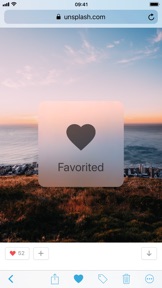
iPhone Screenshots

Screenshot
Screenshot
Screenshot
Screenshot
Screenshot

iPad Screenshots

Screenshot
Screenshot
Screenshot

Beschreibung

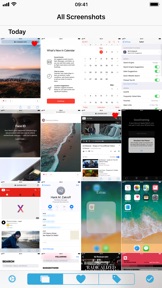
LightScreen brings all of your screenshots into one place, let you organize effortlessly.
Features:
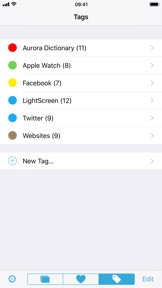
• Sort your screenshots by adding custom tags
• Slide to select multiply screenshots, then batch share, favorite, tagging or delete
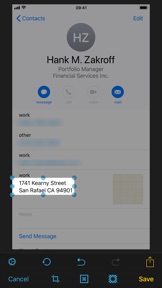
• Crop, part blur or part highlight screenshot
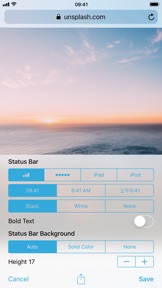
• Clear or hide status bar on screenshot (check app screenshots above for cleaning result)
• Use arrow, box and text to markup screenshot (works together with GoodPoint app)
• Pick color from screenshot, and save as RGB or Hex value
• 2 themes: Light and Dark. Quick switch themes just by shake your device
• Check recent screenshots on Today Widget
• Hide all screenshots from the Photos app's main page (opt-in)
• Smart detect QR codes in screenshot (64-bit devices only)
• Optimized for one hand using experience on iPhone Plus series
• URL schemes supported
• 3D Touch supported
• iPad Split View supported
[New] Drag & Drop for iPad on iOS 11
- Drag images from other apps to LightScreen for convert images to screenshots and save to iOS Photo Library
- Drag screenshots from any view in LightScreen to other apps to quick export screenshots
How to take screenshots?
• iPhone X: Press volume up and sleep/wake button
• Other iOS devices: Press Home and sleep/wake button

Neue Funktionen von Version 2.14.6

Thank you for using LightScreen! This update includes improvements and bug fixes.
2.14.6
• Better iCloud Photo Library support
- Added iCloud download progress indicator in Editor view
- Fixed an issue where screenshot cannot be reverted to original in Editor view because the original screenshot needs to be downloaded from iCloud
• Minor user interfaces adjustments
2.14
• Optimized for Super Retina display on iPhone X
• Status bar editor now fully supports screenshots that taken on iPhone X
• New gesture: Use 2 fingers to swipe left or right to switch themes, just like the Aurora Dictionary app
• Launch screen now uses dark theme
• Optimized UI and UX for iOS 11
If you have any questions or suggestions, please contact us by sending an email to lightscreen.app@gmail.com
If you enjoy LightScreen, please consider leaving a positive review on App Store, thank you :)

Anbieter

Informationen

Entwickler

Kategorien

Version

2.14.6

Größe

30 MB

Game Center

Nein

VPP Device Licensing

Ja

Bewertung

Altersfreigabe: 4+

Kompatibilität

iOS 9.0 oder neuer

Geräte

iPad Air, iPad mini 4 (Cellular), iPad mini 3, iPad mini (5. Generation), iPad Pro (11") Wi-Fi + Cellular, iPad (5. Generation) Wi-Fi + Cellular, iPad (6. Generation) Wi-Fi + Cellular, iPad Pro, iPad mini (5. Generation) Wi-Fi + Cellular, iPad Pro (12,9", 3. Generation), iPod touch (6. Generation), iPad mini Retina (Cellular), iPad Air (Cellular), iPad Air 2 (Cellular), iPad mini 4, iPad Pro (12,9", 3. Generation) Wi-Fi + Cellular, iPad Pro (12,9", 2. Generation), iPad (5. Generation) Wi-Fi, iPad Air (3. Generation) Wi-Fi + Cellular, iPad Pro (Cellular), iPad Pro (12,9", 2. Generation) Wi-Fi + Cellular, iPhone 8 Plus, iPad Pro (9,7 Zoll), iPhone XR, iPad Air 2, iPad (6. Generation) Wi-Fi, iPad Air (3. Generation), iPhone 8, iPad Pro (10,5") Wi-Fi + Cellular, iPhone 6s, iPad Pro (9,7 Zoll) (Cellular), iPhone 7, iPhone 7 Plus, iPhone XS Max, iPhone 6, iPhone X, iPhone 6 Plus, iPhone XS, iPad Pro (10,5"), iPhone SE, iPhone 5s, iPhone 6s Plus, iPad mini 3 (Cellular), iPad Pro (11")

Sprachen

Chinesisch, Englisch

App Store: Kundenbewertungen

Bewertungen & Rezensionen

4,0 von 5 (5 Bewertungen)

App Store: Kundenrezensionen

2015-12-24

Ärgerlich

Ist das Geld nicht wert. Sorry. Kaum Leistungsumfang. Wieder gelöscht.
Magtom
Version 2.2